 Measura: Sell by Weight & More
How to sell fabric by the metre or yard in Shopify POS with Measura
Sell cut lengths of fabric in Shopify POS with Measura. Set prices per metre or yard, enter fractional lengths, edit the cart, and track remaining fabric stock.
Updated
Measura lets fabric shops sell cut lengths by the metre or yard directly in Shopify POS. Staff select a configured fabric variant, enter the length being sold, and add it to the cart with a calculated price. With inventory management enabled on an eligible plan, Measura can also track the fractional fabric stock remaining at the sale’s location.
A customer buying 2.3 metres should pay for that cut length. Your staff need to check the fabric, unit, measurement, and price before checkout, then verify that the completed sale is reflected in stock and on the customer’s receipt.
This guide uses two separate worked examples: 2.3 m at $24/m and 2.25 yd at $18/yd. These are illustrative prices in the store’s currency, before tax, discounts, or other adjustments. They are not equivalent prices converted between units or recorded merchant transactions.
Set up the fabric as a length-based product
In Measura’s setup, choose POS as a sales channel, or both POS and online if you use both. An online store is not required to sell measured fabric at the counter.
Assign the fabric product to a length-based product group and configure its base measurement. For the metre example, use:
- Fabric variant: the specific colour or pattern the customer is buying.
- Base measurement: 1 metre.
- Product price: $24 for that metre.
The base measurement describes how much fabric the product price represents. If you instead price the product per half metre, the price must match that half-metre amount. For example, $12 per 0.5 m represents the same $24/m rate; $24 per 0.5 m does not.
Choose the variant carefully. Different colours or patterns can have different prices and inventory, even when they share the same selling unit. Check the product’s availability at the POS location and that your Measura plan covers the locations and inventory features you need.
Add Measura to Shopify POS and enter the cut length
Add the Add Measura products tile to the Shopify POS smart grid, following the app’s setup instructions. Open the tile and select the configured fabric variant.
Measure the length being supplied, then enter 2.3 with metres as the selected unit. Check the unit beside the value before adding the item. A value of 2.3 m means 230 cm; it does not mean 2 metres and 3 centimetres.
For fabric priced at $24 per metre, the item calculation is:
2.3 m × $24/m = $55.20
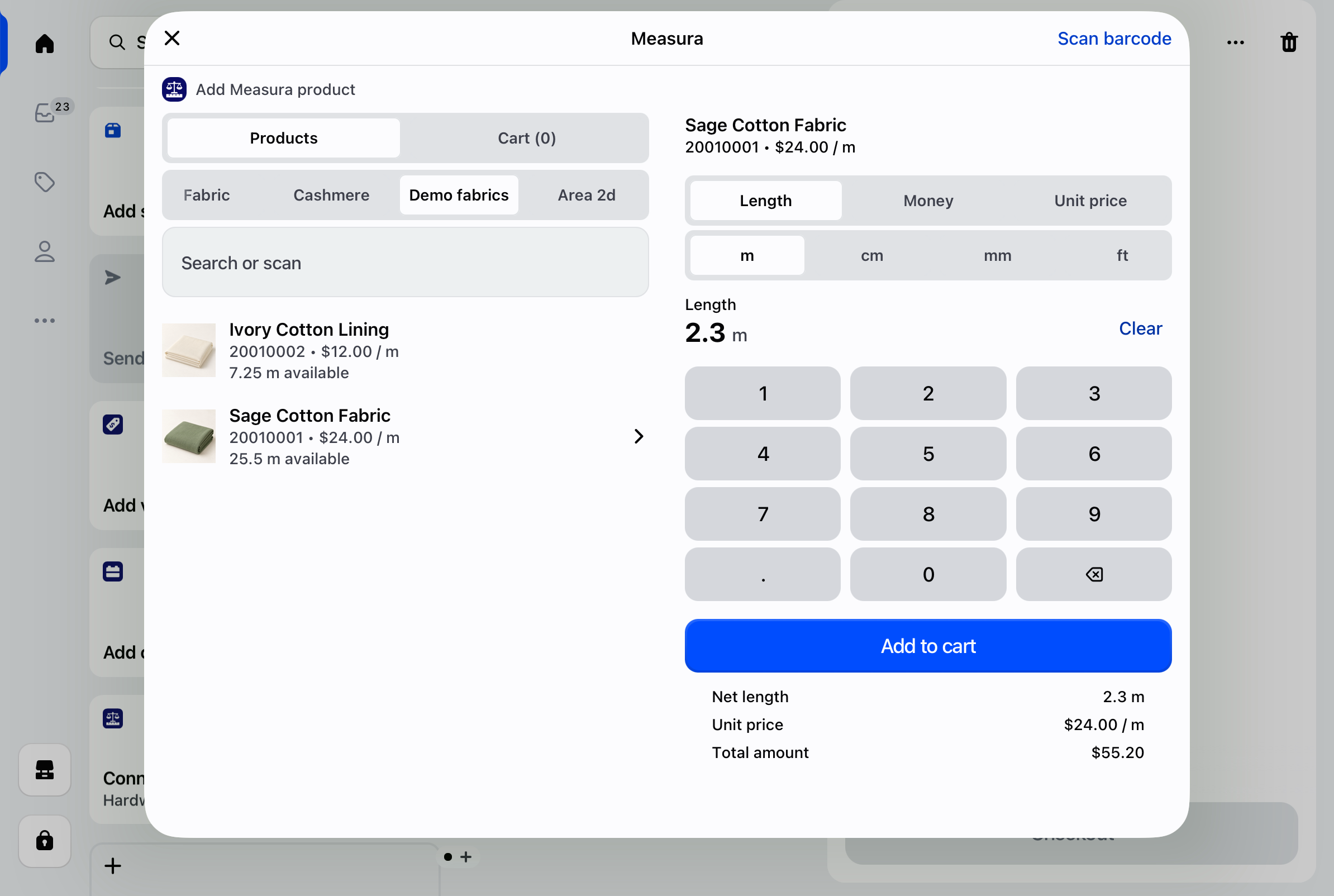
Review Measura’s calculated amount, then choose Add to cart. Check the fabric variant, recorded length, and price in the Shopify POS cart before taking payment.
This example uses one cut of fabric. Keep the measured length and line quantity distinct: increasing the number of units on a measured line is not the same as changing the length of a single cut. Check the result whenever you change either field.
The Measura POS setup guide includes a recording of the general product-selection and cart workflow using a weighed product. For fabric, use the length configuration and units described here.
Selling by the yard? Match the unit and price
For a fabric variant sold at $18 per yard, configure a base measurement of 1 yd and a product price of $18. A customer buying 2.25 yd would have an item amount of:
2.25 yd × $18/yd = $40.50
Measura supports length units including metres and yards. Which units staff can select and the decimal precision depend on your settings. Configure the units your team uses, then test a representative fractional cut before going live.
If you enter a different unit from the product’s base unit, Measura’s measurement calculation accounts for the unit conversion. Still review the unit and calculated price: changing a unit label does not make a price per metre equal to that same numeric price per yard.
For everyday selling, using the same unit on shelf labels, measuring tools, product configuration, and staff entry makes the calculation easier to check. A quarter-yard cut can be entered as 0.25 yd when that precision and your purchase rules allow it.
Correct the length before completing checkout
If the customer changes the requested cut length while the sale is still in the cart, use the Measura edit item cart action after enabling it through the app’s POS setup instructions. The main smart-grid tile and the cart edit action are configured separately.
Change the measurement and review the updated item amount before checkout. For example, changing our $24/m fabric from 2.3 m to 2.5 m changes the item price from $55.20 to $60.00, before other adjustments.
Once the order has been created, a correction uses a different workflow. Eligible measured-order changes require the optional Order edit add-on. It can also be used for supplied fabric lengths; the measured-order correction guide explains eligibility, fulfilled-item behavior, and payment follow-up. Saving an order correction does not automatically collect or refund money.
Check the fabric remaining after the sale
Suppose the selected variant starts with 20 m of tracked fabric at the selling location. After the original 2.3 m sale is completed and processed, with no other adjustments, the expected balance is:
20 m − 2.3 m = 17.7 m remaining
Check inventory after the order has been processed, rather than expecting a cart entry alone to prove the stock result. Confirm the variant, location, base measurement, and inventory settings when comparing balances. For a yard-based product, review the balance in its configured units.
The fractional inventory guide explains measured balances, Shopify stock units, rounding, and location setup in more detail.
A total length balance does not by itself describe the continuous pieces you have available. For example, 3 m spread across two remnants might not satisfy an order for one unbroken 2.3 m cut. Check the physical fabric as part of your cutting process, and account for offcuts or other stock adjustments separately from the customer’s purchased length.
Verify receipts and prepare your team
Run a small test sale with a fractional length. Check the measured entry, cart price, checkout result, stock balance, and the receipt formats your store actually uses.
Follow Measura’s receipt setup instructions where template changes are needed. Email and printed receipts can render differently, so inspect each relevant format for an understandable product name, length, unit price, and total. If a receipt is missing expected details, contact Atomic POS support with the receipt type and a redacted example.
If you also prepare sewing kits from the same fabric, use the fabric kit guide to understand when assembly deducts components and creates finished-kit stock. Keep those assembly movements separate from ordinary cut-length sales so you do not deduct material twice.
Start with one fabric variant and the units your staff use most often. Once its price, stock, and receipt behavior are correct, apply that setup to your other fabrics.
Explore Measura, install it from the Shopify App Store, or contact us with your fabric-selling workflow.