Flexible field targeting
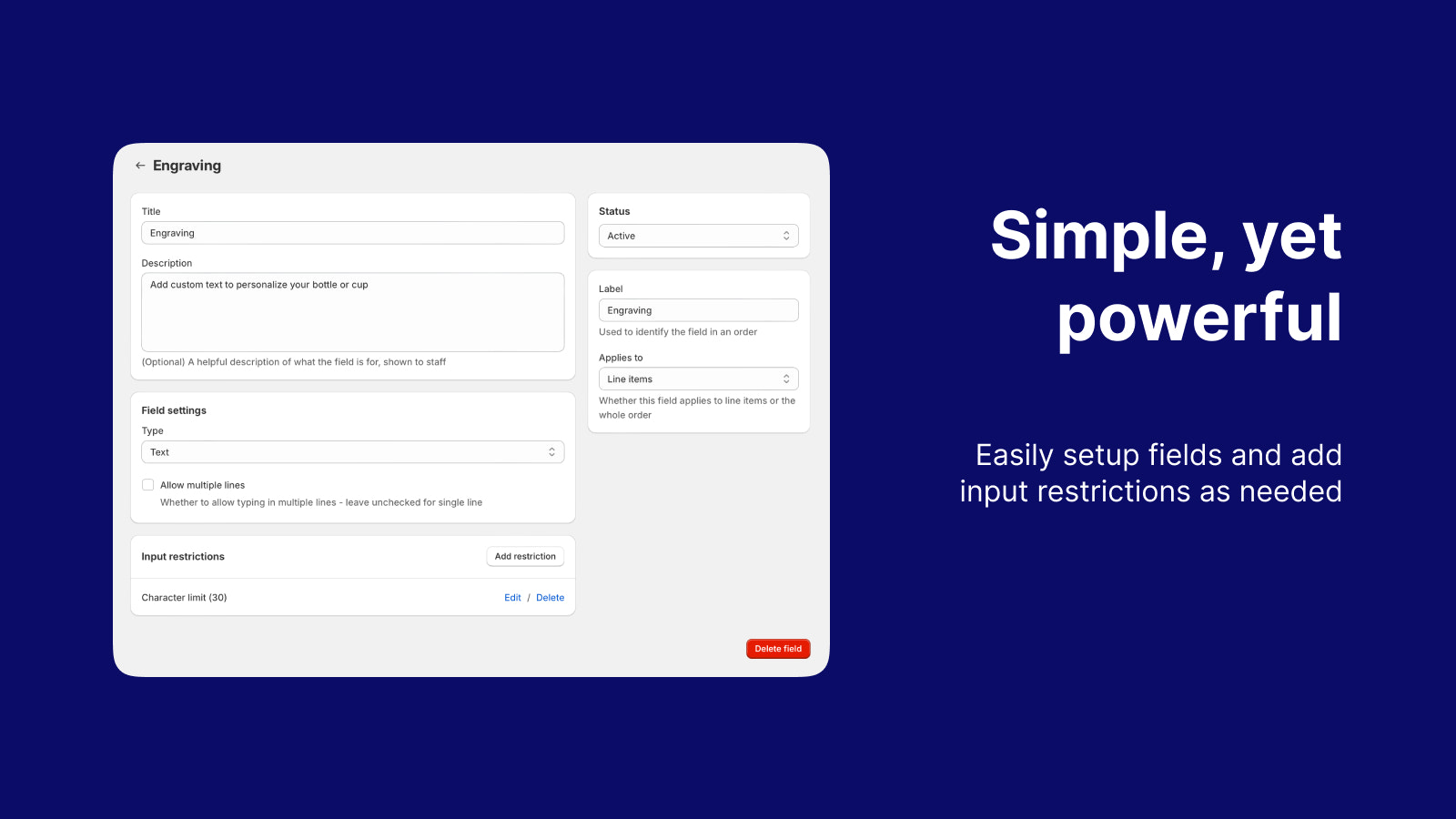
Apply custom fields at the order level or to individual line items. Perfect for both order-wide instructions and product-specific customizations.
 / Custom Fields
 Custom Fields by Atomic POS
The gift message. The special request. The detail your team needs. Collect custom information at checkout and keep it with the order in Shopify POS.
Explore plans and trial terms on Shopify.
A personal touch, kept with the order
One order. A few thoughtful details.
36/80 characters · example text field
A little something to make your day.
Just because · Gift wrap requested
Interactive illustration · stays in this page
Shopify POS
Order and item fields
Text, numbers, lists & checkboxes
Inside the app
Screenshots from our Shopify App Store listing. Open an image to see the details.
 View full size
 Choose a field type, assign it to items or orders, and configure input restrictions.
 View full size
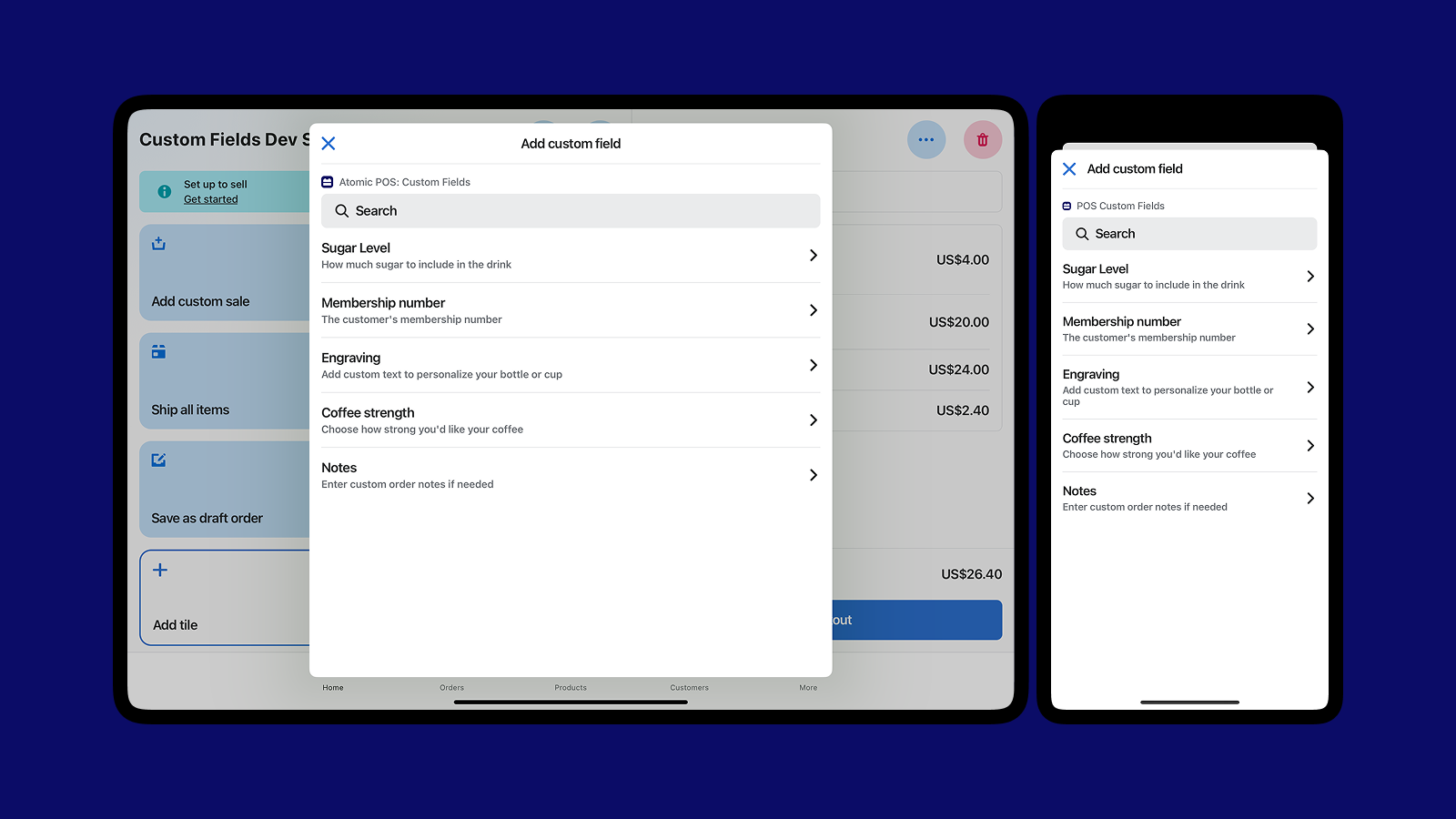
 Staff can select the relevant field from a searchable list in Shopify POS.
Everything you need to capture custom information in Shopify POS
Apply custom fields at the order level or to individual line items. Perfect for both order-wide instructions and product-specific customizations.
Configure custom fields to appear only at specific store locations. Enable location-specific workflows and different field requirements for different stores.
Native POS extension with customizable tile on the POS home screen. User-friendly modal interface where staff can add custom field values during checkout.
Custom field data seamlessly integrates with Shopify's email and print templates. Ready-to-use Liquid template code provided for quick implementation.
Character limits, min/max values, decimal precision, required fields, and more. Full control over input restrictions to ensure data quality.
Create as many custom fields as you need. No hard limits on the number of fields, allowing complete flexibility for complex business needs.
Setup is quick and easy. Create custom fields and start capturing information at checkout.
Install from the Shopify App Store and grant required permissions. The app integrates seamlessly with your POS.
Use the intuitive admin interface to create and configure fields. Choose field types, set validation rules, and configure location targeting.
Set fields to Active status and they'll appear in POS. Staff can immediately start using the POS tile to add custom field values during checkout.
Detailed capabilities
Explore supported workflows, configuration options, and examples for your business.
Choose the right field type for your business requirements
Capture free-form text input such as special instructions, notes, or descriptions. Perfect for delivery instructions, customer preferences, and custom notes.
Perfect for variable pricing, weights, quantities, or measurements. Supports decimal precision control and value restrictions.
Create dropdown or multi-select lists for predefined options. Ideal for product variations, service selections, or standardized choices.
Simple yes/no or true/false options for quick selections, confirmations, or boolean data capture.
Everything included in one plan
Whether you're selling customizable products, offering services, or need to capture detailed order information, Custom Fields adapts to your needs.
Enable merchants to sell products with custom pricing determined at the point of sale. Perfect for custom jewelry, services, or wholesale pricing with quantity-based adjustments.
Capture important order details like delivery instructions, preparation notes, special handling requirements, and customer preferences.
Allow customers to specify product variations such as engraving text, color preferences, size specifications, and material selections.
Perfect for service providers who need to capture appointment details, service duration, special requirements, and customer notes.
Configure location-specific fields for different store requirements. Enable tailored workflows based on location needs.
Capture all necessary information at checkout that appears in receipts and email notifications. Professional presentation of custom data.
Room to grow
One plan with all features included
All features included. Create unlimited custom fields for your POS checkout.
$5/mo
Plus $2 per additional POS location per month
Install Custom FieldsScroll the table to see every plan.
| Feature | Custom Fields |
|---|---|
| Multiple field typesText, number, list, and checkbox fields. Support for single-line, multi-line, character limits, decimal precision, and more. | ✓ |
| Order and line item fieldsApply custom fields at the order level or to individual line items. Perfect for both order-wide instructions and product-specific customizations. | ✓ |
| Location-based filteringConfigure custom fields to appear only at specific store locations. Enable location-specific workflows and requirements. | ✓ |
| POS tile integrationNative POS extension with customizable tile on the POS home screen. Easy-to-use modal interface for staff during checkout. | ✓ |
| Template integrationCustom field data appears in email notifications and POS receipts. Ready-to-use Liquid template code provided. | ✓ |
| Advanced validationCharacter limits, min/max values, decimal precision, required fields, and more. Full control over input restrictions. | ✓ |
| Unlimited custom fieldsCreate as many custom fields as you need. No hard limits on the number of fields you can create. | ✓ |
| Status managementSet fields to Active or Draft status. Prepare fields before going live and manage them easily. | ✓ |
Prices in USD. Review trial terms and billing details on Shopify. Need help choosing? ↗
Made for your way of selling
Join merchants using custom fields to sell variable-priced products, capture special instructions, and personalize orders.